What is Tinker?
Fine-tuning large language models usually means dealing with distributed GPU infrastructure, managing cluster failures, and debugging complex training scripts. Tinker, released by Mira Murati's Thinking Machines Lab on October 1, 2025, solves that problem. It is a training API that handles all infrastructure complexity while giving you full control over your algorithms and data.
The platform enables writing simple Python scripts with four core functions, and Tinker runs them across distributed GPUs for a wide range of open-source models like Llama 70B or Qwen 235B. It uses Low-Rank Adaptation (LoRA) fine-tuning to reduce costs and supports everything from supervised learning to reinforcement learning. Research teams at Princeton, Stanford, and Berkeley already use it for their work.
In this tutorial, we walk through installing Tinker, understanding its API, and fine-tuning a complete financial Q&A model using the Qwen3-8B base model.
Who uses Tinker?
The platform targets three groups: researchers exploring new training methods, developers building AI products that need custom behavior, and builders who want production-quality results without enterprise resources.
Each group shares a common need: they know what they want their model to do, but standard fine-tuning interfaces do not give them enough control. Academic teams use it to test novel algorithms. A chemistry lab might train models on domain-specific reasoning patterns that do not fit typical instruction-tuning templates. A startup building a financial advisor bot could use the model to follow specific output formats and reasoning chains.
All of these use cases have in common that they need to modify the training process itself, not just swap datasets.
What makes Tinker different?
Most platforms optimize for one of two things: ease of use or flexibility. Tinker does both. The platform gives you low-level access to training through four core operations, but handles everything else automatically.
Training loop control lets you write your own loss functions, gradient accumulation strategies, or sampling patterns. Model updates specify exactly how weights should change during optimization. Evaluation generates outputs or computes probabilities at any point in training. State management saves and resumes training with full control over what gets persisted.
Tinker exposes these capabilities through four API primitives: forward_backward, optim_step, save_weights, and sample. Running a custom training loop on your laptop is straightforward. Running it across 100 GPUs with failure recovery and resource scheduling is hard. Tinker handles the second part so you can focus on the first.
Where Tinker fits in the ecosystem
The AI tooling ecosystem splits roughly into three layers: cloud compute providers that give you raw GPUs, managed platforms that run predefined workflows, and frameworks that help you build training systems from scratch. Tinker sits between the managed platforms and the frameworks. You get more control than platforms like Hugging Face AutoTrain, but less infrastructure work than setting up a custom cluster on Google Cloud Platform.
Tinker Pricing and credits
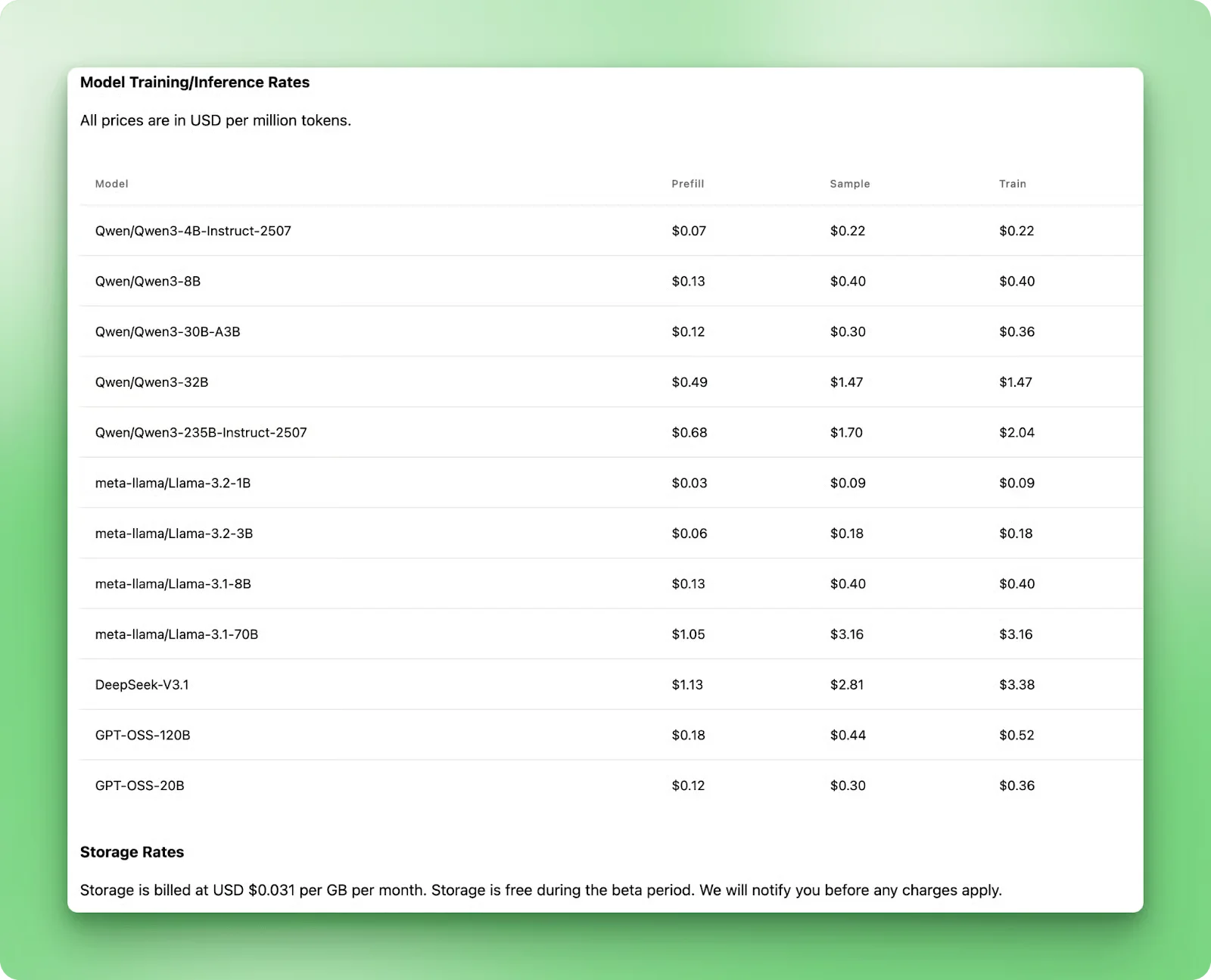
Tinker uses transparent per-token pricing that varies by model size and operation type. Training Qwen3-8B costs $0.40 per million tokens. New users receive $150 in credits when they are cleared from the waitlist, which more than covers several experimental training runs like the one in this tutorial.
Fine-Tuning Qwen3-8B for Financial Q&A
In this section, we walk through building a complete fine-tuning workflow using Tinker's API. We fine-tune Qwen3-8B on financial question-answering data using LoRA, learning all four core API primitives while seeing production best practices in action.
Training results and checkpoint selection
Let's look at the training results first. Understanding what happened helps you spot these patterns when you run your own fine-tuning jobs. We fine-tuned Qwen3-8B on the [FinCoT dataset](https://huggingface.co/datasets/TheFinAI/FinCoT), a chain-of-thought financial reasoning dataset, using LoRA with rank 32. After filtering for sequences not longer than 10,000 tokens, we had 7,244 training examples and 500 examples for validation to work with.
Training ran for 904 iterations across four epochs, taking approximately three hours to complete, while Tinker handled all the distributed GPU coordination. An epoch is one complete pass through the entire training dataset. Since there were 226 batches per epoch (7,244 examples divided by a 32 batch size), the four epochs totaled 904 iterations.
Analyzing the training results
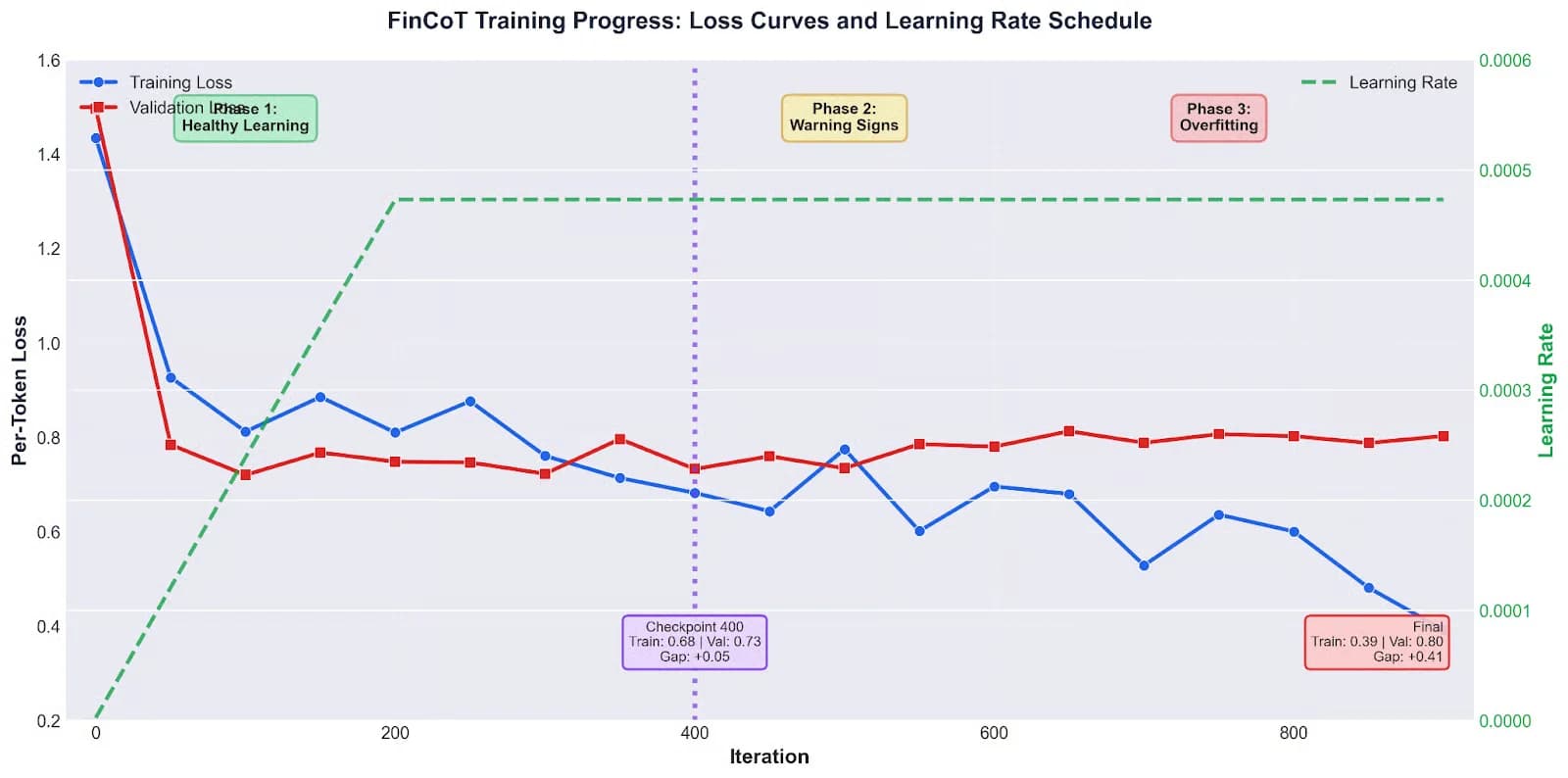
The chart below tracks three metrics: training loss (blue), validation loss (red), and learning rate (green).
Early training (iterations 0-400) looks healthy: both the training and validation losses drop together sharply, falling from over 1.4 to below 0.8 and staying within about 0.1 of each other. This period demonstrates that the model is effectively learning generalizable patterns in the data. The learning rate ramps up smoothly during the first 200 iterations as warmup stabilizes training.
Around iteration 400-600, things shift. Training loss keeps dropping, but validation loss plateaus around 0.75-0.8, widening the gap to 0.13 as the model starts to overfit. By iteration 600-900, the divergence becomes obvious: training loss plummets to 0.39 while validation loss rises to 0.8, showing the model has shifted from learning reasoning patterns to memorizing examples.
This pattern is common when fine-tuning reasoning models. The model saved at checkpoint-400 offers the best generalization, with a training loss of 0.68, a validation loss of 0.73, and a small gap of just 0.05. Despite having a higher training loss than the final checkpoint, it handles new questions better. The lowest training loss rarely produces the best model, which is why validation metrics matter.
We will verify this later by comparing the model at checkpoint-400 against the base model using an LLM judge. For now, let us walk through building this fine-tuning workflow step by step.
Step 1: Install Tinker and set up your environment
You will need Python 3.11 or later and a stable internet connection. Since Tinker handles GPU training on their servers, a good connection is more important than having a powerful computer. Start by signing into the Tinker console and creating an API key. Store this key in a .env file in your project directory.
Install the required packages: pip install tinker transformers torch datasets python-dotenv numpy. Now set up your imports and a retry helper function. When training on remote servers, you might see temporary connection errors that do not mean anything is actually wrong. Your training job is still running fine on Tinker's infrastructure. This retry wrapper handles those transient failures automatically.
TINKER_API_KEY=your_key_here

import time
import numpy as np
from dotenv import load_dotenv
from datasets import load_dataset
import tinker
from tinker import types

def with_retry(future, max_attempts=3, delay=5):
    for attempt in range(max_attempts):
        try:
            return future.result()
        except Exception as e:
            if attempt == max_attempts - 1:
                raise
            time.sleep(delay)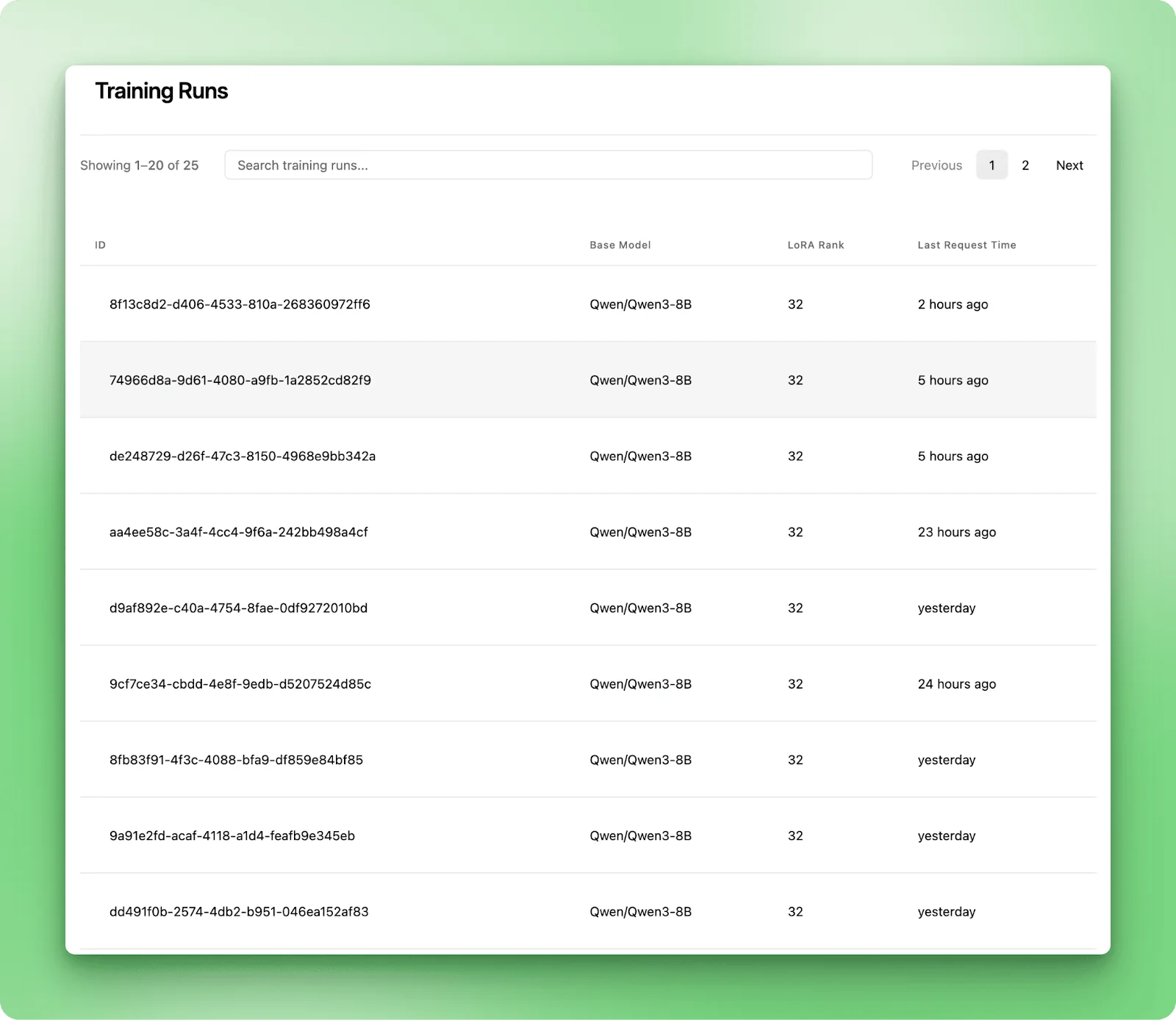
Step 2: Initialize the ServiceClient and load the dataset
The ServiceClient is your entry point to Tinker. It finds available models and handles authentication. You will not use it much after this initial setup; it mainly exists to create training and sampling clients for specific models.
Now it is time to load the FinCoT dataset. It contains financial questions paired with step-by-step reasoning chains and final answers. Unlike simple Q&A datasets, FinCoT teaches the model to show its work before providing answers, an important skill for financial advisory applications where users need to understand the reasoning behind recommendations.
The dataset includes an SFT split with complete reasoning chains and an RL split for reinforcement learning. Use the SFT split for training and sample from the RL split for validation to ensure the model generalizes to different examples. This gives us 7,244 training examples after filtering and 500 validation examples.
load_dotenv()
service_client = tinker.ServiceClient()

dataset = load_dataset("TheFinAI/FinCoT")

train_data_raw = dataset["SFT"]
val_data_raw = dataset["RL"].shuffle(seed=42).select(range(500))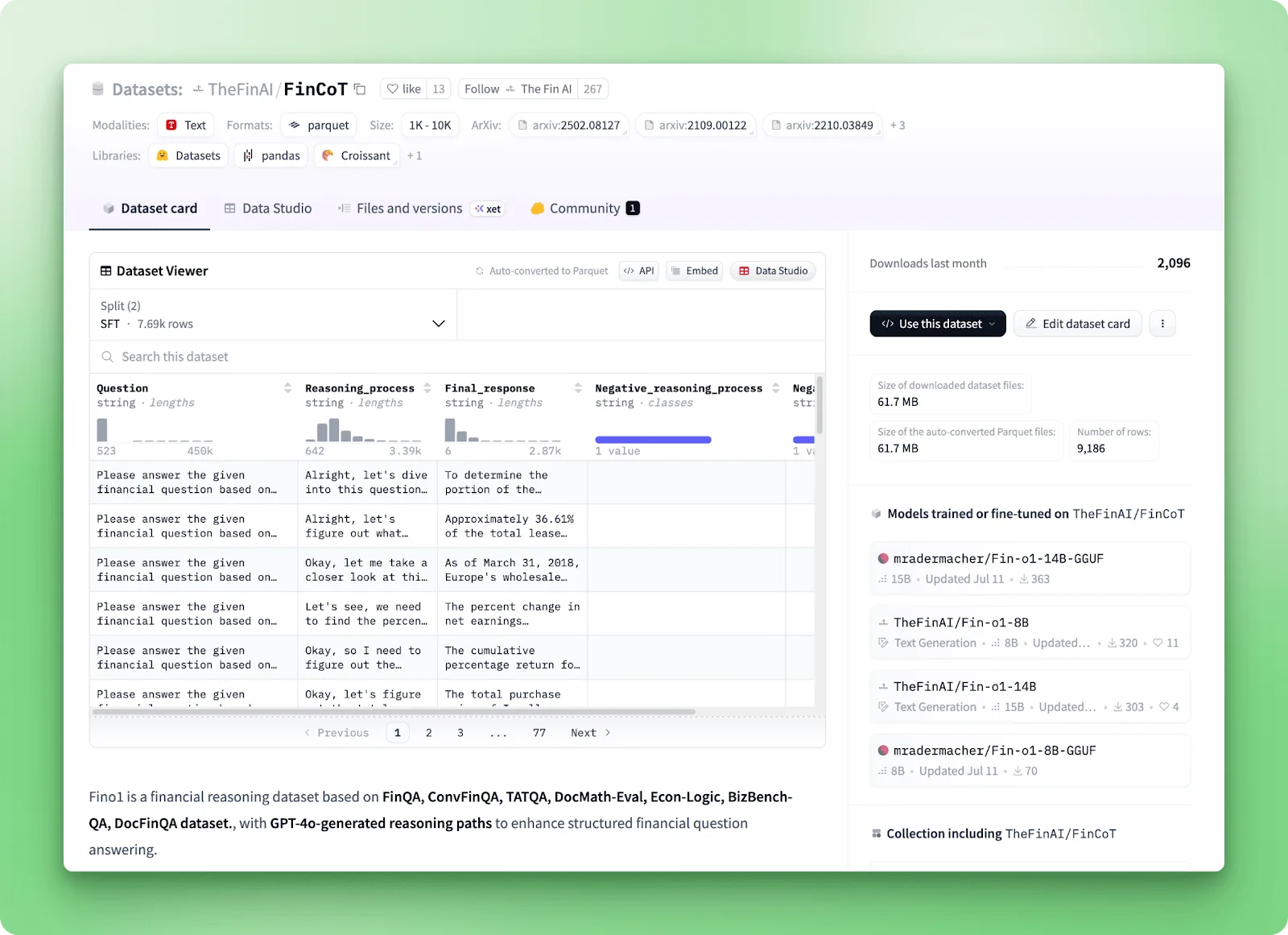
Step 3: Create your LoRA training client
Now create a LoRA training client for Qwen3-8B with rank 32. Instead of updating all 8 billion parameters, LoRA trains small adapter layers that modify the base model's behavior. Think of it like adding custom lenses to a camera rather than rebuilding the entire camera. The base model stays frozen on Tinker's servers; you are only training these tiny adapters.
A rank of 32 works well for datasets with 5,000-10,000 examples. Larger datasets might need rank=64 or rank=128 for more adaptation capacity. Language models do not work with words directly. They work with tokens, which represent pieces of text. A tokenizer breaks text into these pieces. For example, "financial" might become one token, while "understanding" might split into "under" and "standing." By getting the tokenizer from the training client, you make sure you use the exact same tokenization that Qwen3-8B expects.
training_client = service_client.create_lora_training_client(
    base_model="Qwen/Qwen3-8B",
    rank=32
)

tokenizer = training_client.get_tokenizer()
Step 4: Transform data into Tinker's format
Tinker needs your training data in a format called types.Datum. This format separates the model input from the loss function configuration, giving you precise control over which tokens contribute to training.
When fine-tuning language models, you typically want the model to learn how to generate good answers, not memorize the questions. You do this by assigning different weights to different parts of the input: prompt tokens (the question) get weight 0.0, and completion tokens (the answer) get weight 1.0.
Different models expect different formatting for multi-turn conversations. Qwen3 uses special tokens like <|im_start|> and <|im_end|> to mark message boundaries. Split each message into observation parts (role headers) and action parts (actual content). The FinCoT dataset provides structured reasoning, so we concatenate the Reasoning_process and Final_response fields. This teaches the model to show its work before answering.
Tokenize each part separately to track weight boundaries, combine all tokens, and filter sequences that are too long. Filtering examples above 10,000 tokens removes only 5-6 percent of data while significantly improving training reliability.
A critical detail: tokens and weights must be shifted for next-token prediction. Language models predict the next token in a sequence. When the model sees tokens 0-9, it should predict token 10. So your targets are always the input shifted one position forward. You must shift the weights along with the tokens. If you do not shift the weights, the loss calculation will be misaligned: the model would get trained on predicting the first answer token, but the weight at that position would still be 0.0 from the prompt. This alignment bug can prevent the model from learning properly.
def prepare_datum(example, max_length=10000):
    user_ob = "<|im_start|>user\n"
    user_ac = f"{example['Question']}<|im_end|>"
    assistant_ob = "\n<|im_start|>assistant\n"
    assistant_ac = f"{example['Reasoning_process']}\n\nFinal Answer: {example['Final_response']}<|im_end|>"

    user_ob_tokens = tokenizer.encode(user_ob, add_special_tokens=False)
    user_ac_tokens = tokenizer.encode(user_ac, add_special_tokens=False)
    assistant_ob_tokens = tokenizer.encode(assistant_ob, add_special_tokens=False)
    assistant_ac_tokens = tokenizer.encode(assistant_ac, add_special_tokens=False)
    all_tokens = user_ob_tokens + user_ac_tokens + assistant_ob_tokens + assistant_ac_tokens

    if len(all_tokens) > max_length:
        return None

    weights = np.array(
        [0.0] * len(user_ob_tokens) +
        [0.0] * len(user_ac_tokens) +
        [0.0] * len(assistant_ob_tokens) +
        [1.0] * len(assistant_ac_tokens)
    )

    input_tokens = all_tokens[:-1]
    target_tokens = all_tokens[1:]
    weights_shifted = weights[1:]

    return types.Datum(
        model_input=types.ModelInput.from_ints(tokens=input_tokens),
        loss_fn_inputs=dict(weights=weights_shifted, target_tokens=target_tokens),
    )


training_data_raw = [prepare_datum(example) for example in train_data_raw]
training_data = [d for d in training_data_raw if d is not None]
skipped = len(train_data_raw) - len(training_data)

print(f"Processed {len(training_data)} examples (skipped {skipped} too-long sequences)")
# Output: Processed 7,244 examples (skipped 442 too-long sequences)

# Process validation data
val_data_raw_processed = [prepare_datum(example) for example in val_data_raw]
val_data = [d for d in val_data_raw_processed if d is not None]

print(f"Validation set: {len(val_data)} examples")
Step 5: Training loop — validation loss function
The training loop uses two of Tinker's core API primitives: forward_backward and optim_step. First, define a validation loss function to catch overfitting early. Unlike training loss, validation loss tells you how well your model generalizes to unseen data.
The forward method computes the loss without calculating gradients, making it efficient for evaluation where you only need to measure performance, not update weights.
def compute_validation_loss(val_data, batch_size=100):
    """Compute loss on validation set (forward only, no backward)"""
    batch_indices = np.random.choice(
        len(val_data), size=min(batch_size, len(val_data)), replace=False
    )
    batch = [val_data[i] for i in batch_indices]

    fwd_future = training_client.forward(batch, loss_fn="cross_entropy")
    fwd_result = with_retry(fwd_future)

    loss_sum = fwd_result.metrics["loss:sum"]
    total_completion_tokens = sum(
        np.sum(np.array(val_data[i].loss_fn_inputs["weights"].data) > 0)
        for i in batch_indices
    )
    return loss_sum / total_completion_tokens if total_completion_tokens > 0 else 0
Training configuration and loop
Training configuration: 4 epochs, batch size of 32. Learning rate is approximately 4.7e-4, calculated using a formula that accounts for Qwen3-8B's hidden size of 4,096 and an empirically-determined exponent. LoRA requires significantly higher learning rates than full fine-tuning, typically 10-20 times larger.
Learning rate warmup over the first 200 iterations prevents gradient explosions early in training when the model has not adapted to the task. The warmup gradually increases the learning rate from near-zero to the target value. You can see this clearly in the training visualization, where the learning rate ramps up smoothly during the first 200 iterations.
In each iteration, forward_backward computes gradients using cross-entropy loss. optim_step updates the model parameters based on those gradients using the Adam optimizer. Both methods return future objects immediately, letting Tinker process multiple operations simultaneously.
Checkpoints are saved every 200 iterations, creating snapshots you can compare. Checkpoint-400 generalizes better than the final checkpoint despite higher training loss. The checkpoints persist on Tinker's servers after your script finishes. Tinker organizes them into two categories: full-state checkpoints for resuming training and sampler weights for inference.
n_samples = len(training_data)  # 7,244
n_epochs = 4
batch_size = 32
learning_rate = 5e-5 * 10.0 * (2000 / 4096) ** 0.0775  # ≈ 4.7e-4
warmup_steps = 200
num_iterations = n_epochs * (n_samples // batch_size)  # 904

checkpoint_interval = 200
validation_interval = 50

losses = []
per_token_losses = []
val_losses = []

for iteration in range(num_iterations):
    batch_indices = np.random.choice(len(training_data), size=batch_size, replace=False)
    batch = [training_data[i] for i in batch_indices]

    if iteration < warmup_steps:
        current_lr = learning_rate * (iteration + 1) / warmup_steps
    else:
        current_lr = learning_rate

    fwdbwd_future = training_client.forward_backward(batch, loss_fn="cross_entropy")

    optim_future = training_client.optim_step(types.AdamParams(learning_rate=current_lr))

    fwdbwd_result = with_retry(fwdbwd_future)
    optim_result = with_retry(optim_future)

    loss_sum = fwdbwd_result.metrics["loss:sum"]
    total_completion_tokens = sum(
        np.sum(np.array(training_data[i].loss_fn_inputs["weights"].data) > 0)
        for i in batch_indices
    )
    per_token_loss = loss_sum / total_completion_tokens

    losses.append(loss_sum)
    per_token_losses.append(per_token_loss)

    if iteration % 10 == 0:
        warmup_indicator = "🔥" if iteration < warmup_steps else ""
        print(f"{warmup_indicator} Iteration {iteration} | Train: {per_token_loss:.4f} | LR: {current_lr:.6f}")

    # Compute validation loss periodically
    if iteration % validation_interval == 0:
        val_loss = compute_validation_loss(val_data)
        val_losses.append((iteration, val_loss))
        gap = val_loss - per_token_loss
        print(f"  📊 Iteration {iteration} | Train: {per_token_loss:.4f} | Val: {val_loss:.4f} | Gap: {gap:+.4f}")

    # Checkpoint every 200 iterations
    if iteration > 0 and iteration % checkpoint_interval == 0:
        training_client.save_weights_for_sampler(name=f"fincot-checkpoint-{iteration}")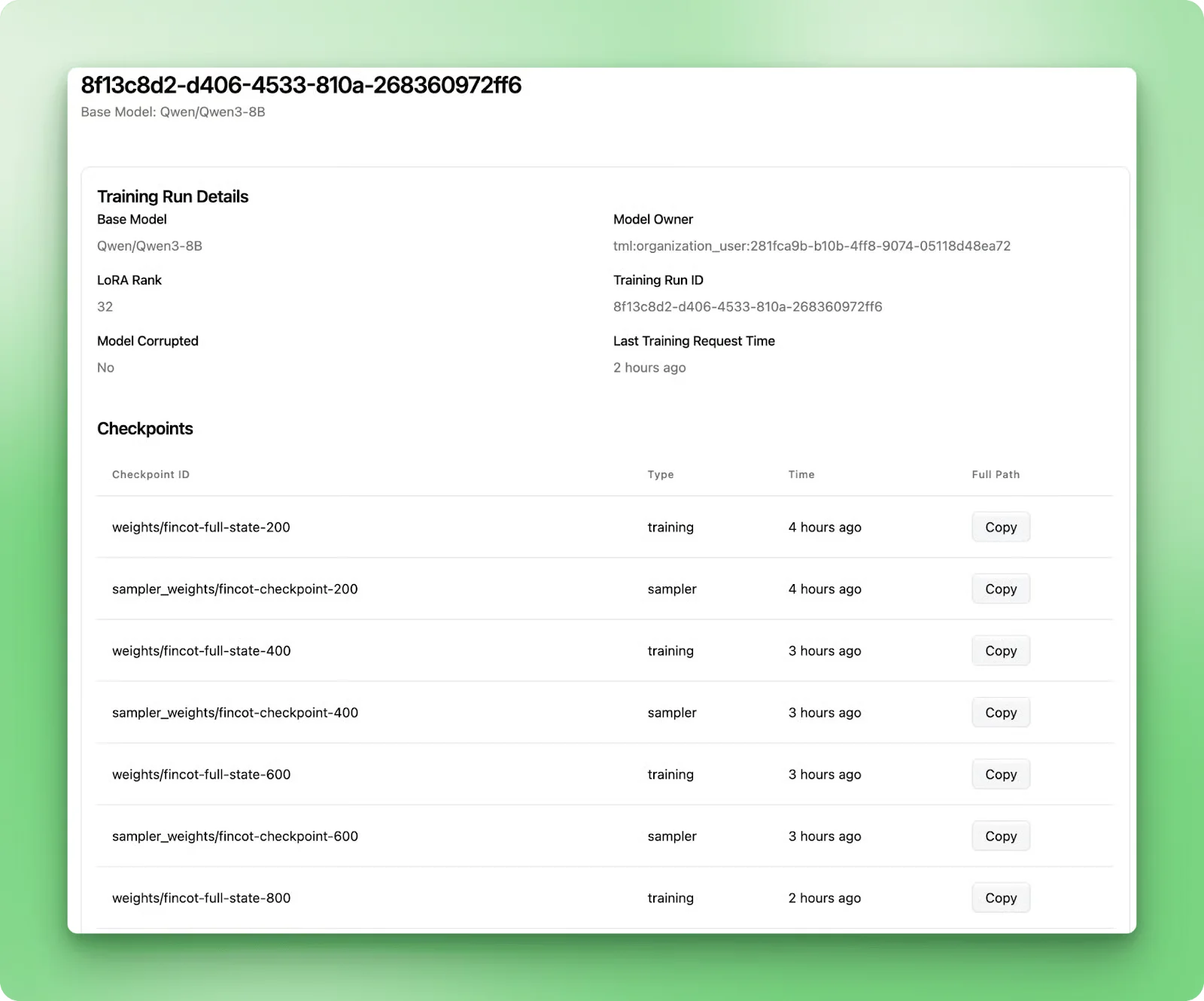
Add periodic validation checks and checkpoints
Saving weights every 200 iterations creates snapshots you can compare. As you saw in the training results earlier, checkpoint-400 generalizes better than the final checkpoint despite higher training loss. Always save multiple checkpoints and evaluate them on held-out data. The checkpoints persist on Tinker's servers after your script finishes.
    # Compute validation loss periodically
    if iteration % validation_interval == 0:
        val_loss = compute_validation_loss(val_data)
        val_losses.append((iteration, val_loss))
        gap = val_loss - per_token_loss
        print(f"  📊 Iteration {iteration} | Train: {per_token_loss:.4f} | Val: {val_loss:.4f} | Gap: {gap:+.4f}")

    # Checkpoint every 200 iterations
    if iteration > 0 and iteration % checkpoint_interval == 0:
        training_client.save_weights_for_sampler(name=f"fincot-checkpoint-{iteration}")
Step 6: Save your fine-tuned model
After training completes, save the final model weights. The weights are saved on Tinker's servers, not your computer. The LoRA adapters typically require only tens of megabytes. Tinker can optionally export them for use with external inference providers if you want to deploy the model outside their infrastructure.
sampling_client = training_client.save_weights_and_get_sampling_client(
    name="financial-qa-qwen3-8b-lora"
)
Step 7: Test the model with sample questions
Finally, test your fine-tuned model using the sample API primitive. Configure sampling parameters: max_tokens of 200 for response length (roughly 150 words), temperature of 0.7 to balance coherence with variety, top_p of 0.9 for nucleus sampling, and stop sequences to mark end of generation.
Generate responses for test questions. The response object contains a sequences list because you can request multiple samples per prompt. Access the tokens through sequences[0].tokens and decode them back to text using the same tokenizer.
Here are example outputs from the fine-tuned model. For "What are the main risks associated with investing in stocks?", the model responds: "Investing in stocks carries several key risks. Market risk represents the potential for stock prices to decline due to economic downturns or market volatility. Company-specific risk arises from poor management decisions, competitive pressures, or operational failures that affect individual stocks. Liquidity risk occurs when you cannot sell shares quickly without significantly impacting the price. Additionally, investors face inflation risk, where returns may not keep pace with rising prices..."
For "How does diversification help reduce portfolio risk?", the model responds: "Diversification reduces portfolio risk by spreading investments across different asset classes, sectors, and geographic regions. When you hold multiple uncorrelated assets, losses in one investment can be offset by gains in others. For example, if technology stocks decline but healthcare stocks rise, a diversified portfolio experiences less volatility than one concentrated in technology alone. The key principle is that different assets respond differently to market conditions..."
sampling_params = types.SamplingParams(
    max_tokens=200,
    temperature=0.7,
    top_p=0.9,
    stop_sequences=["<|im_end|>"]
)

questions = [
    "What are the main risks associated with investing in stocks?",
    "How does diversification help reduce portfolio risk?"
]

for question in questions:
    model_input = types.ModelInput.from_ints(tokenizer.encode(question))
    response = with_retry(
        sampling_client.sample(
            prompt=model_input,
            num_samples=1,
            sampling_params=sampling_params
        )
    )
    answer = tokenizer.decode(response.sequences[0].tokens)
    print(f"Q: {question}")
    print(f"A: {answer}\n")
Evaluating with an LLM judge
To measure performance objectively, we used LLM-as-judge: GPT-4o evaluated checkpoint-400 against base Qwen3-8B on 10 diverse financial questions, scoring each response on accuracy, clarity, completeness, and financial terminology.
The fine-tuned model scored 8.5 out of 10, compared to 6.5 for the base model, winning all 10 comparisons. The verdicts reveal why: it delivers complete explanations with confident, structured reasoning, while the base model hedges with uncertain language and incomplete thoughts. This validates checkpoint-400's better real-world performance. The lower training loss at iteration 900 would have given us memorization, not reasoning.
For the full evaluation setup, check the comparison script and detailed results on GitHub.
Conclusion
You have seen how Tinker simplifies fine-tuning without sacrificing control. Four core API primitives—forward_backward, optim_step, save_weights_and_get_sampling_client, and sample—give you the building blocks for custom training workflows while Tinker handles the distributed infrastructure.
The financial Q&A model demonstrates best production practices: validation tracking caught overfitting early, checkpoint-400 outperformed the final model by focusing on generalization, and LLM-as-judge evaluation confirmed a 2-point improvement over the base model. These patterns apply whether you are fine-tuning 8B or 70B parameter models.
The platform is in beta with waitlist access. The training runs for this tutorial cost 150 starter credits, so with the initial credits you can run this tutorial 6 times plus additional experiments. Next steps include trying fine-tuning on domain-specific data, experimenting with different LoRA ranks and learning rates, or exploring advanced training paradigms like reinforcement learning from human feedback.
The Tinker cookbook on GitHub offers examples for these scenarios. Next steps include trying fine-tuning on domain-specific data, experimenting with different LoRA ranks and learning rates, or exploring advanced training paradigms like reinforcement learning from human feedback.